Why Detecting Legal Risk in Casualty Claim Files is Harder than it Looks

The 2,000-Page Needle in a Haystack
Picture a 2,000-page claim file landing on a senior claim professional's desk. It arrives as a disorganised PDF bundle: police reports, handwritten doctor's notes, repair shop estimates, intake forms, billing statements, attorney correspondence, endless email chains.
Somewhere in that stack sits one deceptively simple question, the kind a trained adjuster can usually answer just by flipping through the file:
"Has the claimant retained an attorney?"
In a world of RAG-based search, it's tempting to assume the answer is one query away. It isn't. Anyone who handles complex bodily-injury or litigated claims knows that identifying even the simplest of these “risk factors” inside unstructured insurance files is anything but straightforward. Here's why, and what an extraction framework needs to get it right.
1. The Keyword Illusion: Why String Search Fails
A. The same word, a dozen meanings
“Attorney” and “counsel” surface constantly in claim files, and neither word means what it appears to mean on its own.
Document excerpt | Keyword match |
"Plaintiff retained legal counsel following the accident." | counsel |
"No attorney has been retained at this time." | attorney |
Expanding the keyword list to catch synonyms only compounds the risk. Search for “counsel” and a note reading “He took my counsel and moved on” fires the same false alarm as an actual representation letter.
B. Whose attorney is it, anyway?
Even an unambiguous match doesn't say which party it belongs to. “Attorney” can point to the claimant, the defense, an unrelated prior case, or a form that has nothing to do with litigation.
Document excerpt | Keyword match | Relationship |
"Plaintiff retained legal counsel following the accident." | counsel | Relation to plaintiff |
"Defense attorney submitted additional evidence." | attorney | Relation to defendant |
"Prior attorney withdrew from unrelated 2018 slip-and-fall." | attorney | Relation to a prior case |
"Power of Attorney form executed for property handling." | Attorney | Relation to an administrative form |
C. Which of these is actually a risk signal?
Layer claim relevance on top of the same three matches and the picture changes again. Only one of the three below represents active legal risk.
Document excerpt | Keyword match | Actual claim meaning |
"Plaintiff retained legal counsel following the accident." | counsel | Active risk: claimant attorney retained |
"No attorney has been retained at this time." | attorney | No risk: explicit negation |
"Prior attorney withdrew from unrelated 2018 slip-and-fall." | attorney | No risk: historical, unrelated litigation |
This is where keyword search collapses in production. Words appear in dozens of contexts that have zero bearing on active claim risk, so a workflow that relies on string detection alone flags every one of these documents. The adjuster still has to open each file and rule out the false positives by hand, which means the software hasn't saved time. It has added an extra review step.
How DocLens solves the keyword illusion
Instead of raw string matching, DocLens evaluates every mention in its full semantic and operational context, using two purpose-built layers:
Role and entity binding. DocLens reads sentence structure and document hierarchy to determine whose attorney is being referenced, and separates claimant representation from defense counsel, co-defendants and neutral third parties.
Negation and temporal filtering. Contextual modifier clauses are evaluated to automatically discard explicit negations (“no attorney retained”) and historical references (“prior attorney in 2018 case”), so only active, current risk gets flagged.
Ontological concept mapping. Rather than searching for the literal word “attorney,” DocLens normalizes hundreds of contextual variants (Counsel of Record, retained legal representation, law firm header, Esq.) into a single validated risk signal: Legal_Representation_Retained.
Document excerpt | Static keyword output | DocLens contextual output | DocLens extraction logic |
"No attorney has been retained at this time." | Risk detected (attorney) - false positive | No risk detected | Contextual negation parser identifies “No attorney…retained” and suppresses the alert. |
"Defense attorney submitted additional evidence regarding liability." | Risk detected (attorney) - false positive | No claimant risk (defense counsel) | Role-binding logic distinguishes insurer/defense counsel from claimant representation. |
"Prior attorney withdrew from unrelated 2018 slip-and-fall." | Risk detected (attorney) - false positive | No active risk (historical event) | Temporal entity parsing recognizes the 2018 event as historical, non-active litigation. |
2. Why Generic LLMs and Basic RAG Fall Short
When string matching fails, the obvious next move is to load the entire 2,000-page file into a large language model, or run it through a basic Retrieval-Augmented Generation (RAG) pipeline. In practice, both approaches buckle under the volume and nuance of a real casualty claim file.
The “lost in the middle” problem. Long-context LLMs suffer measurable retrieval degradation over hundreds of pages. A single-line representation letter buried on page 147 of a 1,200-page medical record packet is exactly the kind of detail they overlook.
Token scale and semantic overload. A typical 2,000-page claim file runs 1 to 2 million tokens. Terms like “attorney,” “counsel,” or a law firm name can appear over 100 times, and most of those mentions are defense counsel, co-defendants, historical litigation or administrative boilerplate.
Context-blind vector weighting. Basic RAG scores and retrieves chunks on raw semantic similarity. Without domain context, the retriever assigns heavy weight to text that is semantically dense but functionally irrelevant, and floods the prompt with false signal.
The limits of fine-tuning. Fine-tuning a base LLM on claim files looks like a fix on paper, but it introduces model drift, high retraining cost and rigid hallucination patterns, a problem substantial enough to deserve its own article.
How DocLens solves it: Retrieve, Reduce, Augment, Validate
DocLens replaces a single vector lookup with a domain-built, four-stage pipeline:
Retrieve (layout-aware chunking). Parses the full file into structural, visually-aware chunks that preserve form geometry, headers, footers and tables.
Reduce with context. Filters out noise by dynamically discarding boilerplate defense notices and state-agency mentions, using document hierarchy and role binding.
Augment with a risk signal ontology. Maps implicit terms (Esq., Counsel of Record, State Bar No., LLP) directly onto Legal_Representation.
Validate. Runs a second pass that filters out negations (“no attorney retained”) and historical references (“prior 2018 litigation”).
Claim scenario | Naive RAG / generic LLM | Failure mode / root cause | Contextual RAG (DocLens) |
Deeply buried notice: a one-line representation letter on page 147 of a 1,200-page packet. | “No attorney representation found in the file.” | Lost-in-the-middle effect: semantic search prioritized high-density medical notes over the isolated representation chunk. | Signal detected: claimant attorney retained (p. 147, para. 2), with the exact bounding-box snippet. |
Implicit representation: letterhead reads “Morgan & Vance LLP,” signed “R. Vance, Esq., Counsel of Record” - the word “attorney” never appears. | “No attorney mentioned in the document.” | Ontology gap: vector search relied on exact keyword semantics and missed legal suffixes (Esq.), firm structures (LLP) and court roles (Counsel of Record). | Signal detected: Esq. and LLP mapped through the risk signal ontology to flag active legal representation. |
The first two problems are about interpreting language correctly. The third is upstream of language entirely: reading and interpreting the page itself before any of the logic above ever runs.
3. The Structural Maze: Forms, Checkboxes and Entity Formats
Legal representation is frequently recorded structurally rather than stated in a sentence, which introduces a different class of extraction problem.
A. Visual forms and checkboxes
Visual form content | Standard text OCR output | Actual state |
Legal Counsel Retained? [ ] Yes [X] No | "Legal Counsel Retained? Yes No" | No representation (checkbox on “No”) |
Representation Type [X] Attorney [ ] Pro Se | "Representation Type Attorney Pro Se" | Attorney retained (checkbox on “Attorney”) |
Intake questionnaires and initial claim forms convey information through spatial alignment and visual marks, not complete sentences.Standard text extraction flattens the layout and outputs both “Yes” and “No” as plain text. Without visual understanding, downstream software has no way to tell which box was actually checked.
B. Option-code selection boxes
The same problem shows up in a harder form inside complex court filings and civil intake complaints, where a handwritten code has to be matched back to a legend elsewhere on the page:
A discovery-track selection grid: the handwritten code in the entry box must be matched back to its row in the legend above it.
Standard OCR reads the legend options “10,” “20” and “30” in sequence, then separately extracts the handwritten “20” from the entry box at the bottom of the page. Without multi-modal visual parsing, nothing tells the system that the handwritten “20” refers to “Full discovery, complex expert exchange.”
How DocLens solves the structural maze
DocLens resolves structural ambiguity before tokenization ever begins, combining multi-modal visual OCR with layout-aware spatial routing:
Visual checkbox and geometry parsing. Native vision models read form geometry directly, determining the checked state of a box or option grid without flattening the layout into text.
Spatial field correlation. Isolated bounding boxes, such as a handwritten option code in a selection box, are linked back to their parent table row through spatial coordinate mapping.
Structural scenario | Standard OCR / naive LLM output | DocLens multi-modal output | DocLens parsing logic |
Form checkbox: “Legal Counsel Retained? [ ] Yes [X] No” | "Legal Counsel Retained? Yes No" (LLM guesses the checked state, producing a false positive) | No legal representation (no risk flag) | The visual model reads box coordinates directly, confirming “No” is checked and “Yes” is blank. |
Option grid: handwritten code ‘20’ in the entry box | Extracted string "20" (not connected to the table matrix) | Signal detected: full discovery / complex track (code 20) | Spatial layout model maps the entry box coordinates directly to row 20 of the discovery table. |
4. Building Trust and Auditability
An AI system that simply outputs “Claimant has retained an attorney” is close to useless in a claims environment. Adjusters work under regulatory standards, bad-faith litigation exposure and internal audit controls. They cannot move a reserve, post a coverage decision or escalate a file to litigated handling on a black-box assertion or an unverified confidence score.
If confirming an AI output means manually searching a 2,000-page file anyway, the tool hasn't saved any time. It has added an audit hazard on top of the original problem. Trusting an extraction requires deterministic provenance: the exact document, page and paragraph it came from, and a verifiable view of the source in its original layout.
How DocLens solves auditability
DocLens replaces black-box output with an auditable evidence pipeline that ties every extracted signal back to its source:
Deterministic page and document citations. Every signal is mapped to its parent document, for example Claimant Counsel Identified — Page 147, Paragraph 2, Document: Medical Intake Packet.
Interactive bounding-box highlights. Rather than an isolated text snippet, DocLens renders a pixel-level bounding box over the original scanned PDF, so the adjuster sees the exact checkbox, stamp, signature or letterhead in context.
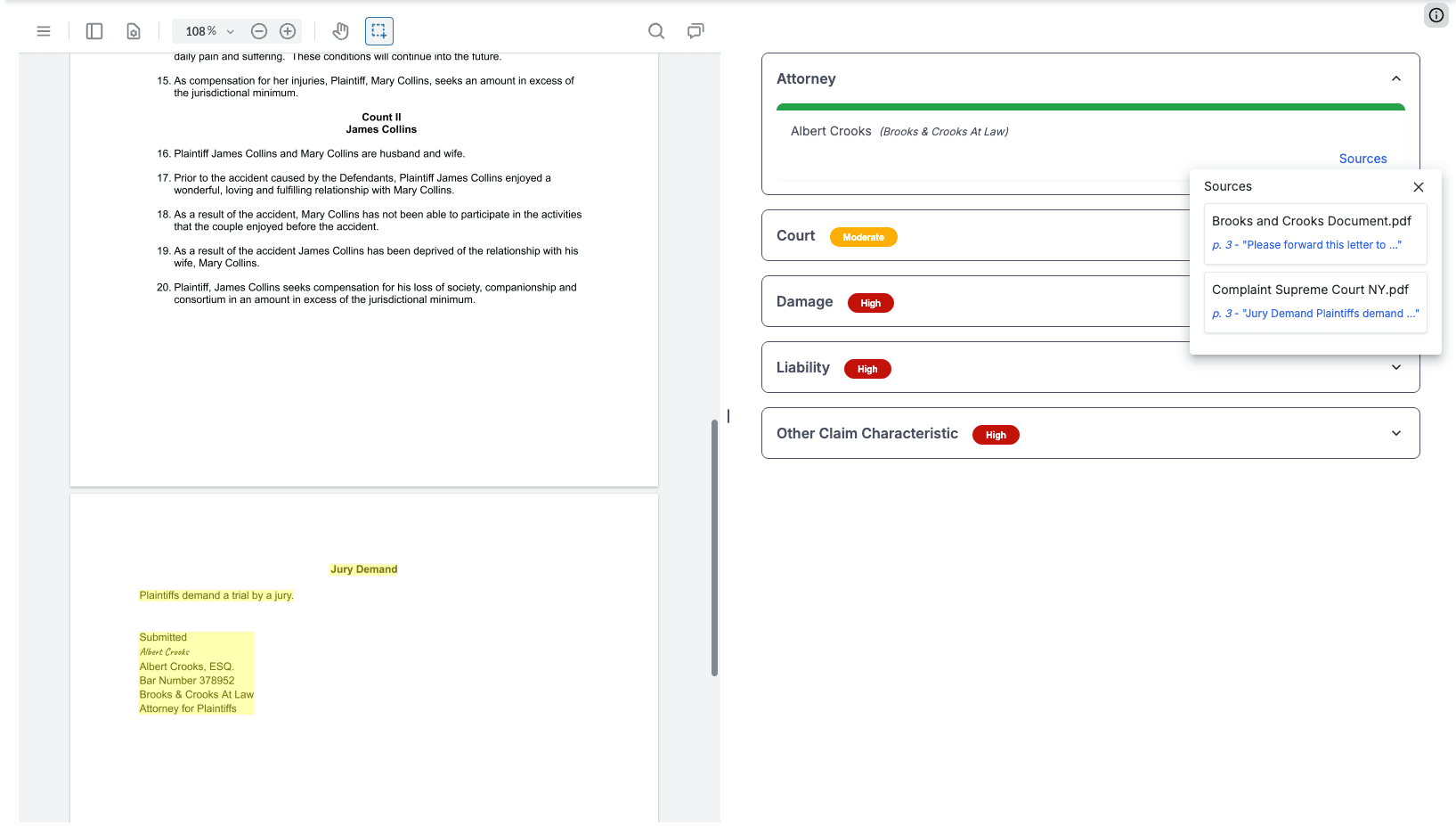
Side-by-side proof viewer. Clicking a risk flag opens the original PDF page next to the signal and highlights the supporting text in real time, for zero-click validation.
The DocLens proof viewer: each extracted attribute links to its exact source document, page and quoted text, so an adjuster can verify a flag without leaving the interface.
Key Takeaway
True insurance document AI isn't about matching keywords or reading raw text. It's about understanding context, visual structure and evidence. In insurance claims, clarity isn't just helpful; it's the foundation of every decision. |